Demo Pipelines
12 comprehensive examples demonstrating FlowMason's capabilities. Each demo includes problem context, solution design, and complete implementation details.
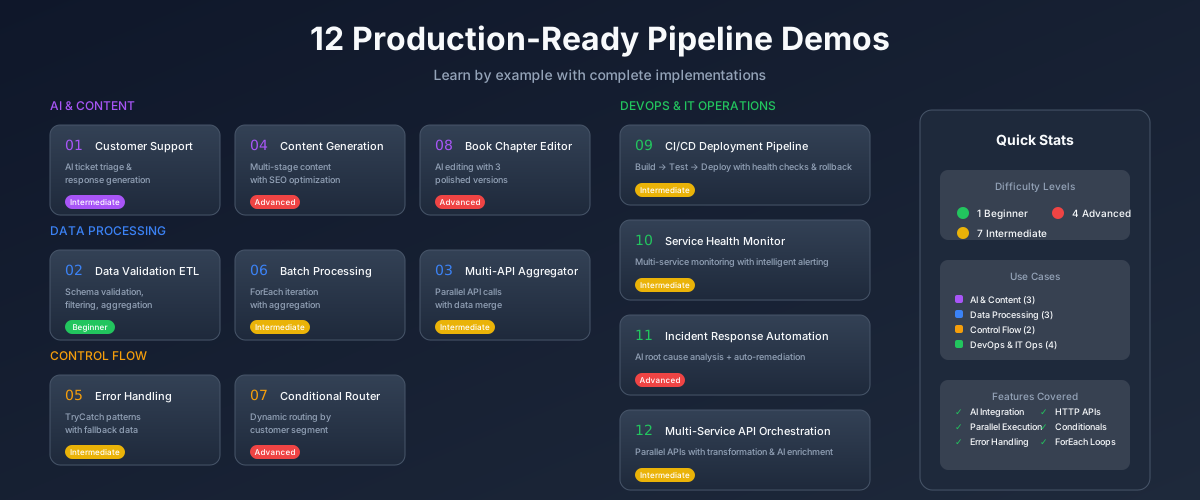
Beginner
Intermediate
Advanced
What You'll Learn
AI Integration
How to use generator nodes with different temperatures for various tasks
Data Transformation
JMESPath expressions for complex data extraction and reshaping
Parallel Execution
Wave-based execution for maximum throughput and efficiency
Error Handling
Try-catch patterns for resilient, production-ready pipelines
API Integration
HTTP requests with response handling and data aggregation
Control Flow
Conditionals, routers, and loops for complex business logic
Run Any Demo
Each demo page includes the complete pipeline JSON and component code. Copy the examples into your own FlowMason project to run them.
# Create a new FlowMason project
fm init my-demos
cd my-demos

# Copy the pipeline JSON from any demo page into pipelines/
# Then run it:
fm run pipelines/customer-support.pipeline.json \
  --input '{"ticket": "My order hasnt arrived"}'