Build this pipeline yourself
Open in the interactive wizard to customize and export
11
Incident Response Automation
Auto-triage alerts, analyze root cause with AI, and remediate known issues
advanced IT Operations
Components Used
http_request json_transform generator router trycatch logger
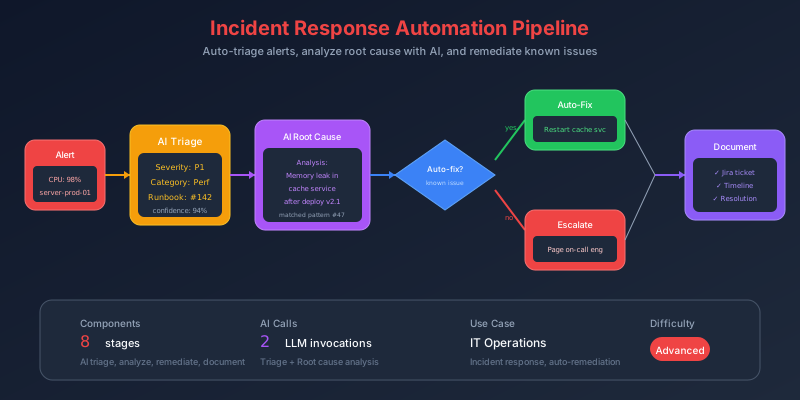
The Problem
Alert fires at 3am. The on-call engineer:
- Wakes up, checks phone (2 min)
- Opens laptop, VPNs in (5 min)
- Reads alert, tries to understand context (5 min)
- SSHs to server, checks logs (10 min)
- Realizes it’s a memory leak they’ve seen before (5 min)
- Restarts the service (2 min)
- Verifies it’s healthy (5 min)
- Goes back to sleep, forgets to document (0 min)
Total: 34 minutes. For a known issue with a documented fix.
Pain Points We’re Solving
- Context gathering - Manually correlating logs, metrics, deploys
- Repeated incidents - Same issue, same fix, nobody automated it
- Alert noise - Woken up for issues that auto-resolve
- Missing runbooks - The fix is in someone’s head, not documented
Thinking Process
What if the pipeline could handle the first 25 minutes automatically?
flowchart TB
    subgraph Auto["Automated (2 min)"]
        A1["Receive alert"]
        A2["Fetch context (logs, metrics, deploys)"]
        A3["AI root cause analysis"]
        A4["Match to known issues"]
        A5["Execute remediation"]
    end

    subgraph Human["Human (if needed)"]
        H1["Review AI analysis"]
        H2["Decide on action"]
        H3["Execute fix"]
    end

    Auto --> |"known issue"| Success
    Auto --> |"unknown issue"| Human
    Human --> Success
Key Insight: Encode Runbooks as Pipelines
Every runbook is: “If X symptoms, do Y actions.” That’s a conditional + actions - exactly what FlowMason does.
Solution Architecture
flowchart TB
    subgraph Alert["Alert Received"]
        I1["PagerDuty webhook"]
        I2["Alert details"]
    end

    subgraph Context["Gather Context"]
        C1["Fetch logs (last 30 min)"]
        C2["Fetch metrics"]
        C3["Recent deploys"]
        C4["Service dependencies"]
    end

    subgraph Analysis["AI Analysis"]
        A1["Root cause identification"]
        A2["Severity assessment"]
        A3["Match known patterns"]
    end

    subgraph Action["Take Action"]
        R1["Known issue → Auto-remediate"]
        R2["Unknown → Escalate to human"]
    end

    subgraph Notify["Update & Notify"]
        N1["Update status page"]
        N2["Notify team"]
        N3["Create postmortem draft"]
    end

    Alert --> Context
    Context --> Analysis
    Analysis --> Action
    Action --> Notify
Pipeline Stages
Stage 1: Parse Incoming Alert
{
  "id": "receive-alert",
  "component": "json_transform",
  "config": {
    "data": "{{input}}",
    "expression": "{alert_id: id, service: payload.source, severity: payload.severity, summary: payload.summary, triggered_at: payload.triggered_at, custom_details: payload.custom_details}"
  }
}
Stage 2-4: Fetch Context (Parallel)
{
  "id": "fetch-logs",
  "component": "http-request",
  "depends_on": ["receive-alert"],
  "config": {
    "url": "{{input.logging_api}}/query",
    "method": "POST",
    "headers": {
      "Authorization": "Bearer {{secrets.LOGGING_TOKEN}}"
    },
    "body": {
      "query": "service:{{stages.receive-alert.output.service}} level:error",
      "from": "-30m",
      "limit": 100
    },
    "timeout": 15000
  }
}
{
"id": "fetch-metrics",
"component": "http-request",
"depends_on": ["receive-alert"],
"config": {
"url": "{{input.metrics_api}}/query_range",
"method": "POST",
"body": {
"query": "up{service=\"{{stages.receive-alert.output.service}}\"}",
"start": "{{now() - 1800}}",
"end": "{{now()}}",
"step": "60"
},
"timeout": 10000
}
}{
"id": "fetch-recent-deploys",
"component": "http-request",
"depends_on": ["receive-alert"],
"config": {
"url": "{{input.deploy_api}}/deployments",
"method": "GET",
"query_params": {
"service": "{{stages.receive-alert.output.service}}",
"since": "-24h",
"limit": 5
},
"timeout": 10000
}
}Stage 5: AI Root Cause Analysis
{
  "id": "analyze-incident",
  "component": "generator",
  "depends_on": ["fetch-logs", "fetch-metrics", "fetch-recent-deploys"],
  "config": {
    "model": "gpt-4",
    "temperature": 0.2,
    "system_prompt": "You are an expert SRE performing incident triage. Analyze the provided data and determine:\n1. Root cause (be specific)\n2. Severity (critical/high/medium/low)\n3. Is this a known issue pattern? (OOM, connection pool, rate limit, etc.)\n4. Recommended immediate action\n5. Confidence level (high/medium/low)\n\nFormat as JSON.",
    "prompt": "Incident triage for {{stages.receive-alert.output.service}}:\n\nAlert: {{stages.receive-alert.output.summary}}\nSeverity: {{stages.receive-alert.output.severity}}\n\n## Recent Logs (errors):\n{{stages.fetch-logs.output.body.logs | tojson}}\n\n## Metrics (last 30 min):\n{{stages.fetch-metrics.output.body | tojson}}\n\n## Recent Deployments:\n{{stages.fetch-recent-deploys.output.body | tojson}}\n\nProvide your analysis:"
  }
}
Stage 6: Route by Issue Type
{
  "id": "determine-action",
  "component": "router",
  "depends_on": ["analyze-incident"],
  "config": {
    "routes": [
      {
        "name": "oom-restart",
        "condition": "{{stages.analyze-incident.output.issue_type == 'OOM' and stages.analyze-incident.output.confidence == 'high'}}",
        "stages": ["auto-restart-service"]
      },
      {
        "name": "connection-pool",
        "condition": "{{stages.analyze-incident.output.issue_type == 'connection_pool_exhausted'}}",
        "stages": ["auto-scale-connections"]
      },
      {
        "name": "recent-deploy",
        "condition": "{{stages.analyze-incident.output.issue_type == 'bad_deploy' and stages.fetch-recent-deploys.output.body[0].age_minutes < 60}}",
        "stages": ["auto-rollback"]
      },
      {
        "name": "unknown",
        "condition": "{{true}}",
        "stages": ["escalate-to-human"]
      }
    ]
  }
}
Stage 7: Auto-Remediation with Safety
{
  "id": "auto-remediate",
  "component": "trycatch",
  "depends_on": ["determine-action"],
  "config": {
    "try": ["execute-remediation", "verify-health"],
    "catch": ["remediation-failed-escalate"],
    "finally": ["log-remediation-attempt"]
  }
}
Stage 8: Execute Restart
{
  "id": "auto-restart-service",
  "component": "http-request",
  "depends_on": ["determine-action"],
  "config": {
    "url": "{{input.k8s_api}}/apis/apps/v1/namespaces/production/deployments/{{stages.receive-alert.output.service}}/scale",
    "method": "PATCH",
    "headers": {
      "Authorization": "Bearer {{secrets.K8S_TOKEN}}",
      "Content-Type": "application/strategic-merge-patch+json"
    },
    "body": {
      "spec": {
        "replicas": 0
      }
    },
    "timeout": 30000
  }
}
{
"id": "restore-replicas",
"component": "http-request",
"depends_on": ["auto-restart-service"],
"config": {
"url": "{{input.k8s_api}}/apis/apps/v1/namespaces/production/deployments/{{stages.receive-alert.output.service}}/scale",
"method": "PATCH",
"body": {
"spec": {
"replicas": "{{stages.receive-alert.output.custom_details.original_replicas | default(3)}}"
}
}
}
}Stage 9: Verify Fix
{
  "id": "verify-health",
  "component": "http-request",
  "depends_on": ["restore-replicas"],
  "config": {
    "url": "https://{{stages.receive-alert.output.service}}.internal/health",
    "method": "GET",
    "timeout": 10000,
    "retry": {
      "max_attempts": 6,
      "delay_seconds": 10,
      "condition": "{{output.status_code != 200}}"
    }
  }
}
Stage 10: Escalate to Human
When auto-fix isn’t possible:
{
  "id": "escalate-to-human",
  "component": "http-request",
  "depends_on": ["determine-action"],
  "config": {
    "url": "{{secrets.PAGERDUTY_EVENTS_URL}}",
    "method": "POST",
    "body": {
      "routing_key": "{{secrets.PAGERDUTY_KEY}}",
      "event_action": "trigger",
      "payload": {
        "summary": "[NEEDS HUMAN] {{stages.receive-alert.output.summary}}",
        "severity": "{{stages.receive-alert.output.severity}}",
        "custom_details": {
          "ai_analysis": "{{stages.analyze-incident.output.root_cause}}",
          "recommended_action": "{{stages.analyze-incident.output.recommended_action}}",
          "confidence": "{{stages.analyze-incident.output.confidence}}",
          "why_not_auto": "{{stages.analyze-incident.output.issue_type}} not in auto-remediation playbook",
          "logs_summary": "{{stages.fetch-logs.output.body.logs | length}} error logs in last 30 min",
          "recent_deploy": "{{stages.fetch-recent-deploys.output.body[0].version}} ({{stages.fetch-recent-deploys.output.body[0].age_minutes}} min ago)"
        }
      }
    }
  }
}
Stage 11: Update Status Page
{
  "id": "update-status",
  "component": "http-request",
  "depends_on": ["verify-health"],
  "config": {
    "url": "{{input.statuspage_api}}/incidents",
    "method": "POST",
    "headers": {
      "Authorization": "OAuth {{secrets.STATUSPAGE_TOKEN}}"
    },
    "body": {
      "incident": {
        "name": "{{stages.receive-alert.output.service}} - {{stages.analyze-incident.output.issue_type}}",
        "status": "resolved",
        "body": "Auto-remediated by FlowMason. Root cause: {{stages.analyze-incident.output.root_cause}}. Action taken: {{stages.analyze-incident.output.recommended_action}}.",
        "component_ids": ["{{input.statuspage_component_id}}"]
      }
    }
  }
}
Stage 12: Notify Team
{
  "id": "notify-team",
  "component": "http-request",
  "depends_on": ["verify-health"],
  "config": {
    "url": "{{secrets.SLACK_WEBHOOK}}",
    "method": "POST",
    "body": {
      "blocks": [
        {
          "type": "header",
          "text": {
            "type": "plain_text",
            "text": "Incident Auto-Resolved"
          }
        },
        {
          "type": "section",
          "fields": [
            { "type": "mrkdwn", "text": "*Service:*\n{{stages.receive-alert.output.service}}" },
            { "type": "mrkdwn", "text": "*Issue:*\n{{stages.analyze-incident.output.issue_type}}" },
            { "type": "mrkdwn", "text": "*Root Cause:*\n{{stages.analyze-incident.output.root_cause}}" },
            { "type": "mrkdwn", "text": "*Action Taken:*\nService restarted" },
            { "type": "mrkdwn", "text": "*Resolution Time:*\n{{execution.duration_ms / 1000 | round(1)}}s" }
          ]
        }
      ]
    }
  }
}
Stage 13: Generate Postmortem Draft
{
  "id": "create-postmortem",
  "component": "generator",
  "depends_on": ["notify-team"],
  "config": {
    "model": "gpt-4",
    "temperature": 0.3,
    "system_prompt": "Generate a concise incident postmortem draft with: Summary, Timeline, Root Cause, Resolution, Action Items. Be factual and specific.",
    "prompt": "Create postmortem for:\n\nService: {{stages.receive-alert.output.service}}\nIncident: {{stages.receive-alert.output.summary}}\nRoot Cause: {{stages.analyze-incident.output.root_cause}}\nTriggered: {{stages.receive-alert.output.triggered_at}}\nResolved: {{now()}}\nAction Taken: {{stages.analyze-incident.output.recommended_action}}\nAuto-resolved: Yes\n\nRecent deploys: {{stages.fetch-recent-deploys.output.body | tojson}}"
  }
}
Execution Timeline
gantt
    title Incident Response Timeline (Auto-Resolved)
    dateFormat X
    axisFormat %L

    section Alert
    receive-alert      :0, 100

    section Context (parallel)
    fetch-logs         :100, 5000
    fetch-metrics      :100, 3000
    fetch-deploys      :100, 2000

    section Analysis
    analyze-incident   :5000, 8000

    section Action
    determine-action   :8000, 8100
    auto-restart       :8100, 15000
    verify-health      :15000, 75000

    section Notify
    update-status      :75000, 76000
    notify-team        :75000, 76000
    create-postmortem  :76000, 79000
Total: ~79 seconds vs 34 minutes manual.
Sample Input
{
  "id": "incident-12345",
  "payload": {
    "source": "payment-service",
    "severity": "critical",
    "summary": "payment-service: High memory usage (>90%)",
    "triggered_at": "2024-01-15T03:42:00Z",
    "custom_details": {
      "memory_percent": 94,
      "pod": "payment-service-abc123",
      "namespace": "production"
    }
  },
  "logging_api": "https://logs.internal.company.com",
  "metrics_api": "https://prometheus.internal.company.com",
  "deploy_api": "https://deploy.internal.company.com",
  "k8s_api": "https://kubernetes.internal.company.com"
}
Expected Output
{
  "incident_id": "incident-12345",
  "service": "payment-service",
  "resolution": {
    "type": "auto-remediated",
    "action": "service_restart",
    "duration_seconds": 79,
    "success": true
  },
  "analysis": {
    "root_cause": "Memory leak in payment processing loop - OOM pattern detected",
    "issue_type": "OOM",
    "confidence": "high",
    "supporting_evidence": [
      "Memory grew from 45% to 94% over 2 hours",
      "No recent deploys (last deploy 3 days ago)",
      "Pattern matches previous OOM incidents"
    ]
  },
  "notifications": {
    "status_page": "updated",
    "slack": "sent",
    "pagerduty": "resolved"
  },
  "postmortem_draft": "Generated and saved to Confluence"
}
Key Learnings
1. Runbook-to-Pipeline Pattern
| Runbook Step | Pipeline Stage |
|---|---|
| ”Check memory usage” | fetch-metrics |
| ”Look at recent logs” | fetch-logs |
| ”Check recent deploys” | fetch-recent-deploys |
| ”If OOM, restart service” | router → auto-restart |
| ”Verify fix worked” | verify-health (retry) |
| “Update status page” | update-status |
2. Safety Guardrails
- Confidence threshold: Only auto-remediate with high confidence
- Known issues only: Unknown patterns escalate to humans
- Verify before closing: Health check confirms fix worked
- Always notify: Team knows what happened, even if auto-fixed
3. AI Analysis Value
The AI doesn’t just say “restart it” - it provides:
- Root cause hypothesis
- Supporting evidence from logs/metrics
- Confidence level for decision making
- Context for the human if escalation needed
Try It Yourself
# Test with a simulated alert
fm run pipelines/devops-incident-response.pipeline.json \
  --input inputs/sample-alert.json