Build this pipeline yourself
Open in the interactive wizard to customize and export
Data Validation & ETL
Schema validation, data normalization, filtering, and aggregation pipeline
Components Used
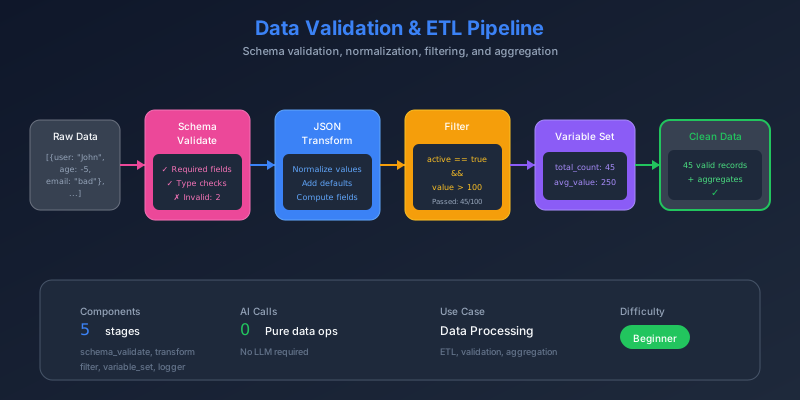
The Problem
Raw data is messy. Whether it’s user imports, API responses, or database exports, real-world data has:
- Missing fields that break downstream processing
- Invalid formats (emails without @, negative ages)
- Inconsistent values (status: “Active” vs “active” vs “1”)
- No computed fields for business logic
Without validation and transformation, bad data propagates through your system causing errors, incorrect analytics, and poor user experiences.
Pain Points We’re Solving
- Silent failures - Bad records slip through and cause issues later
- Manual data cleaning - Hours spent fixing spreadsheets
- No visibility - Which records failed? Why?
- Complex filtering - “High-value active users” requires multiple conditions
Thinking Process
Let’s design an ETL pipeline that handles real-world data quality issues:
flowchart LR
    subgraph Validate["1. Validate"]
        V1["Check required fields"]
        V2["Validate formats"]
        V3["Enforce constraints"]
    end

    subgraph Transform["2. Transform"]
        T1["Add defaults"]
        T2["Normalize values"]
        T3["Compute fields"]
    end

    subgraph Filter["3. Filter"]
        F1["Active users"]
        F2["High-value users"]
    end

    subgraph Aggregate["4. Aggregate"]
        A1["Count totals"]
        A2["Calculate sums"]
        A3["Build summary"]
    end

    Validate --> Transform --> Filter --> Aggregate
Design Decisions
- Schema validation first - Fail fast on invalid data
- Parallel filtering - Active and high-value filters run simultaneously
- Variable storage - Store intermediate counts for summary
- JMESPath expressions - Powerful data transformation without code
Solution Architecture
flowchart TB
    subgraph Input["📥 Raw Records"]
        I1["8 user records"]
        I2["Mixed quality data"]
    end

    subgraph Validate["✅ Schema Validation"]
        V1["Required: id, name, email"]
        V2["email: valid format"]
        V3["age: 0-150"]
        V4["status: active|inactive|pending"]
        V5["score: 0-100"]
    end

    subgraph Transform["🔄 Transform & Normalize"]
        T1["Add default values"]
        T2["Add is_adult flag"]
        T3["Normalize format"]
    end

    subgraph FilterParallel["🔀 Parallel Filtering"]
        direction LR
        F1["Filter Active"]
        F2["Filter High Value<br/>score ≥ 80"]
    end

    subgraph Summary["📊 Summary Statistics"]
        S1["Total records"]
        S2["Active count"]
        S3["High value count"]
        S4["Value totals"]
    end

    Input --> Validate
    Validate --> Transform
    Transform --> FilterParallel
    FilterParallel --> Summary
Pipeline Stages
Stage 1: Validate Schema
Define strict rules for what valid data looks like:
{
  "id": "validate-records",
  "component": "schema_validate",
  "config": {
    "data": "{{input}}",
    "schema": {
      "type": "object",
      "required": ["records"],
      "properties": {
        "records": {
          "type": "array",
          "items": {
            "type": "object",
            "required": ["id", "name", "email"],
            "properties": {
              "id": { "type": "string" },
              "name": { "type": "string", "minLength": 1 },
              "email": { "type": "string", "format": "email" },
              "age": { "type": "integer", "minimum": 0, "maximum": 150 },
              "status": { "enum": ["active", "inactive", "pending"] },
              "score": { "type": "number", "minimum": 0, "maximum": 100 }
            }
          }
        }
      }
    },
    "collect_errors": true
  }
}
Stage 2: Transform & Normalize
Add computed fields and defaults:
{
  "id": "transform-records",
  "component": "json_transform",
  "depends_on": ["validate-records"],
  "config": {
    "data": "{{stages.validate-records.output.data.records}}",
    "expression": "[*].{id: id, name: name, email: email, age: age || `0`, status: status || 'pending', score: score || `0`, is_adult: age >= `18`, processed: `true`}"
  }
}
JMESPath Breakdown:
[*]- Iterate over all recordsage || \0“ - Default to 0 if missingis_adult: age >= \18“ - Computed boolean field
Stages 3-4: Parallel Filtering
Both filters run simultaneously for efficiency:
flowchart LR
    T["Transformed Data"]

    T --> F1["Filter: status == 'active'"]
    T --> F2["Filter: score >= 80"]

    F1 --> R1["Active Users"]
    F2 --> R2["High Value Users"]
{
"id": "filter-active",
"component": "filter",
"depends_on": ["transform-records"],
"config": {
"items": "{{stages.transform-records.output}}",
"condition": "item.status == 'active'",
"mode": "filter_array"
}
}{
"id": "filter-high-value",
"component": "filter",
"depends_on": ["transform-records"],
"config": {
"items": "{{stages.transform-records.output}}",
"condition": "item.score >= 80",
"mode": "filter_array"
}
}Stage 5: Store Count Variable
Save the active count for use in summary:
{
  "id": "store-active-count",
  "component": "variable_set",
  "depends_on": ["filter-active"],
  "config": {
    "variables": {
      "active_user_count": "{{stages.filter-active.output | length}}"
    }
  }
}
Stage 6: Build Summary
Aggregate everything into a final report:
{
  "id": "create-summary",
  "component": "json_transform",
  "depends_on": ["filter-active", "filter-high-value", "store-active-count"],
  "config": {
    "data": {
      "all_records": "{{stages.transform-records.output}}",
      "active": "{{stages.filter-active.output}}",
      "high_value": "{{stages.filter-high-value.output}}"
    },
    "expression": "{total_records: length(all_records), active_count: length(active), high_value_count: length(high_value), total_score: sum(all_records[*].score), high_value_score: sum(high_value[*].score), validation_status: 'passed'}"
  }
}
Data Transformation Visualization
stateDiagram-v2
    [*] --> Raw: Input Records
    Raw --> Validated: Schema Check
    Validated --> Transformed: Add Fields
    Transformed --> Filtered: Apply Filters
    Filtered --> Aggregated: Build Summary
    Aggregated --> [*]: Output

    state Validated {
        [*] --> CheckRequired
        CheckRequired --> CheckTypes
        CheckTypes --> CheckConstraints
        CheckConstraints --> [*]
    }

    state Transformed {
        [*] --> AddDefaults
        AddDefaults --> ComputeFields
        ComputeFields --> Normalize
        Normalize --> [*]
    }
Sample Input
{
  "records": [
    { "id": "USR001", "name": "Alice Johnson", "email": "[email protected]", "age": 28, "status": "active", "score": 92 },
    { "id": "USR002", "name": "Bob Smith", "email": "[email protected]", "age": 35, "status": "active", "score": 78 },
    { "id": "USR003", "name": "Carol White", "email": "[email protected]", "age": 42, "status": "inactive", "score": 85 },
    { "id": "USR004", "name": "David Brown", "email": "[email protected]", "age": 31, "status": "active", "score": 95 },
    { "id": "USR005", "name": "Eve Davis", "email": "[email protected]", "age": 25, "status": "pending", "score": 67 },
    { "id": "USR006", "name": "Frank Miller", "email": "[email protected]", "age": 55, "status": "active", "score": 88 },
    { "id": "USR007", "name": "Grace Lee", "email": "[email protected]", "age": 29, "status": "active", "score": 45 },
    { "id": "USR008", "name": "Henry Wilson", "email": "[email protected]", "age": 38, "status": "inactive", "score": 72 }
  ]
}
Expected Output
{
  "valid_records": [/* 8 transformed records */],
  "active_users": [/* USR001, USR002, USR004, USR006, USR007 */],
  "high_value_users": [/* USR001, USR003, USR004, USR006 */],
  "summary": {
    "total_records": 8,
    "active_count": 5,
    "high_value_count": 4,
    "total_score": 622,
    "high_value_score": 360,
    "validation_status": "passed"
  }
}
Key Learnings
1. JSON Schema Validation
| Constraint | Example | Purpose |
|---|---|---|
required | ["id", "name"] | Fail on missing fields |
format | "email" | Validate patterns |
minimum/maximum | 0-150 | Enforce ranges |
enum | ["active", "inactive"] | Restrict values |
2. JMESPath Power Features
// Default values
age || `0`

// Computed fields
is_adult: age >= `18`

// Aggregations
sum(records[*].score)
length(filtered)
3. Parallel Execution Benefits
The filter stages have no dependencies on each other, so FlowMason runs them simultaneously - cutting execution time in half.
Try It Yourself
fm run pipelines/02-data-validation-etl.pipeline.json \
  --input inputs/02-etl-records.json