Build this pipeline yourself
Open in the interactive wizard to customize and export
Customer Support Triage
AI-powered ticket classification, priority assignment, team routing, and response generation
Components Used
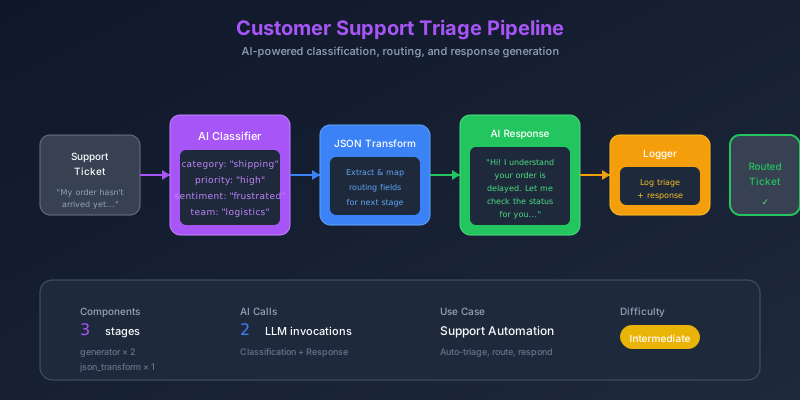
The Problem
Support teams face a common challenge: ticket overload. When hundreds of tickets arrive daily, manually reading, classifying, and routing each one becomes a bottleneck. Customers wait longer, agents waste time on triage instead of solving problems, and urgent issues get buried.
Pain Points We’re Solving
- Slow response times - Manual triage delays initial response by hours
- Inconsistent classification - Different agents categorize tickets differently
- Missed escalations - Enterprise customers don’t get priority treatment
- Generic responses - Copy-paste replies don’t address specific concerns
Thinking Process
Before building the pipeline, let’s think through what we need:
mindmap
  root((Support Triage))
    Classification
      Category
        billing
        technical
        account
        feature_request
        bug_report
        general
      Priority
        critical
        high
        medium
        low
      Sentiment
        positive
        neutral
        frustrated
        angry
    Routing
      Team Assignment
        billing → finance
        technical → engineering
        account → support
      Escalation Rules
        Enterprise tier
        Critical priority
        Angry sentiment
    Response
      Empathetic tone
      Address specific issue
      Set expectations
Key Design Decisions
- AI for classification - LLMs excel at understanding context and nuance in text
- Low temperature (0.1) - We need consistent, predictable classifications
- Structured JSON output - Easy to parse and route based on results
- Separate response generation - Higher creativity for empathetic responses
Solution Architecture
flowchart TB
    subgraph Input["📥 Ticket Input"]
        I1["ticket_id"]
        I2["subject"]
        I3["message"]
        I4["customer_email"]
        I5["customer_tier"]
    end

    subgraph Classification["🤖 AI Classification"]
        C1["Analyze Content"]
        C2["Determine Category"]
        C3["Assess Priority"]
        C4["Detect Sentiment"]
    end

    subgraph Routing["🔀 Smart Routing"]
        R1{"Customer Tier?"}
        R2["Team Assignment"]
        R3["Escalation Check"]
    end

    subgraph Response["💬 Response Generation"]
        RE1["Generate Empathetic Reply"]
        RE2["Address Specific Concerns"]
    end

    subgraph Output["📤 Final Output"]
        O1["category"]
        O2["priority"]
        O3["assigned_team"]
        O4["suggested_response"]
        O5["sentiment"]
    end

    Input --> Classification
    Classification --> Routing
    R1 -->|Enterprise| R3
    R1 -->|Standard| R2
    R3 --> R2
    Routing --> Response
    Response --> Output
Pipeline Stages
Stage 1: Log Ticket Intake
First, we log the incoming ticket for audit and debugging:
{
  "id": "log-intake",
  "component": "logger",
  "config": {
    "level": "info",
    "message": "Processing ticket {{input.ticket_id}}",
    "data": {
      "subject": "{{input.subject}}",
      "tier": "{{input.customer_tier}}"
    }
  }
}
Stage 2: AI Classification
The core intelligence - analyzing the ticket to extract structured information:
{
  "id": "classify-ticket",
  "component": "generator",
  "depends_on": ["log-intake"],
  "config": {
    "system_prompt": "You are a support ticket classifier. Analyze tickets and return JSON with: category, priority, sentiment, and key_issues.",
    "prompt": "Classify this {{input.customer_tier}} customer ticket:\n\nSubject: {{input.subject}}\n\nMessage: {{input.message}}\n\nReturn JSON: {\"category\": \"...\", \"priority\": \"...\", \"sentiment\": \"...\", \"key_issues\": [...]}",
    "temperature": 0.1,
    "max_tokens": 300
  }
}
Why temperature 0.1? We want deterministic, consistent classifications. Higher temperatures would introduce randomness - the same ticket might be classified differently each time.
Stage 3: Parse Classification
Extract the JSON from the AI response:
{
  "id": "parse-classification",
  "component": "json_transform",
  "depends_on": ["classify-ticket"],
  "config": {
    "data": "{{stages.classify-ticket.output}}",
    "expression": "parse_json(@)"
  }
}
Stage 4: Determine Team Assignment
Route to the appropriate team based on category and tier:
{
  "id": "assign-team",
  "component": "json_transform",
  "depends_on": ["parse-classification"],
  "config": {
    "data": {
      "classification": "{{stages.parse-classification.output}}",
      "tier": "{{input.customer_tier}}"
    },
    "expression": "merge(@, {team: case(classification.category, 'billing', 'finance_team', 'technical', 'engineering_team', 'account', 'support_team', 'support_team'), escalate: tier == 'enterprise' || classification.priority == 'critical'})"
  }
}
Stage 5: Generate Response
Create an empathetic, personalized response:
{
  "id": "generate-response",
  "component": "generator",
  "depends_on": ["assign-team"],
  "config": {
    "system_prompt": "You are a helpful support agent. Write empathetic, professional responses that address the customer's specific concerns.",
    "prompt": "Write a response to this {{input.customer_tier}} customer:\n\nIssue: {{input.subject}}\nCategory: {{stages.parse-classification.output.category}}\nKey Issues: {{stages.parse-classification.output.key_issues}}\n\nBe empathetic and address their specific concerns.",
    "temperature": 0.7,
    "max_tokens": 400
  }
}
Why temperature 0.7? Response generation benefits from creativity to sound natural and empathetic, while still staying on topic.
Data Flow Visualization
sequenceDiagram
    participant T as Ticket
    participant L as Logger
    participant AI1 as Classifier
    participant P as Parser
    participant R as Router
    participant AI2 as Response Gen
    participant O as Output

    T->>L: ticket_id, subject, message
    L->>AI1: Log complete
    AI1->>AI1: Analyze with LLM
    AI1->>P: JSON string
    P->>P: parse_json()
    P->>R: {category, priority, sentiment}
    R->>R: Determine team
    R->>AI2: Routing complete
    AI2->>AI2: Generate response
    AI2->>O: Final result
Sample Input
{
  "ticket_id": "TKT-2024-001",
  "subject": "Cannot access my account after password reset",
  "message": "I tried to reset my password yesterday but now I can't log in at all. I've tried multiple times and keep getting an 'invalid credentials' error. This is urgent as I need to access my billing information for an important meeting tomorrow. Please help!",
  "customer_email": "[email protected]",
  "customer_tier": "enterprise"
}
Expected Output
{
  "ticket_id": "TKT-2024-001",
  "category": "account",
  "priority": "high",
  "sentiment": "frustrated",
  "assigned_team": "support_team",
  "escalate": true,
  "suggested_response": "Dear Jane, I completely understand how frustrating it must be to lose access to your account, especially when you have an important meeting tomorrow. I'm treating this as a priority case. Our team is investigating the password reset issue right now. I'll personally ensure we resolve this within the next 2 hours. In the meantime, I've initiated a manual account recovery process..."
}
Key Learnings
1. Temperature Strategy
| Task | Temperature | Reason |
|---|---|---|
| Classification | 0.1 | Deterministic, consistent results |
| Response | 0.7 | Natural, empathetic language |
2. Escalation Logic
The pipeline automatically escalates when:
- Customer tier is “enterprise”
- Priority is “critical”
- Sentiment is “angry”
3. Audit Trail
Every stage logs its actions, creating a complete audit trail for compliance and debugging.
Try It Yourself
fm run pipelines/01-customer-support-triage.pipeline.json \
  --input inputs/01-support-ticket.json