Build this pipeline yourself
Open in the interactive wizard to customize and export
06
Batch Processing
Iterative processing with transformation, filtering, and aggregation
intermediate Data Processing
Components Used
foreach filter json_transform variable_set logger
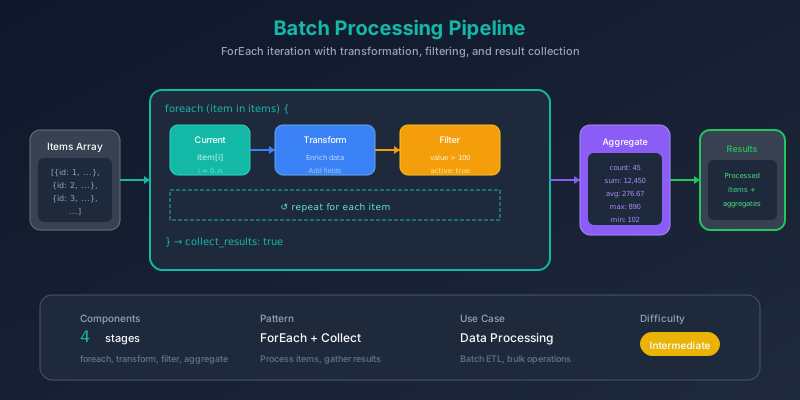
The Problem
You have a collection of items that each need individual processing. Maybe you’re:
- Transforming products - Adding calculated fields to each item
- Enriching records - Looking up additional data per record
- Validating entries - Checking each item against rules
- Generating reports - Creating summaries from item-level data
Processing these manually or with complex loops is error-prone and hard to debug.
Pain Points We’re Solving
- Complex iteration - forEach loops with async operations are tricky
- No visibility - Can’t see which item is being processed
- Lost context - Hard to track index and accumulated results
- Post-processing - Filtering and aggregating loop results
Thinking Process
Let’s design a batch processing pattern:
flowchart TB
    subgraph Design["Design Considerations"]
        D1["How to iterate?"]
        D2["What context is needed?"]
        D3["Collect results?"]
        D4["Post-processing?"]
    end

    D1 --> |"foreach component"| D2
    D2 --> |"item + index"| D3
    D3 --> |"collect_results: true"| D4
    D4 --> |"filter + aggregate"| Done["Ready"]
ForEach vs Parallel
flowchart LR
    subgraph Sequential["Sequential (parallel: false)"]
        S1["Item 1"] --> S2["Item 2"] --> S3["Item 3"]
    end

    subgraph Parallel["Parallel (parallel: true)"]
        P1["Item 1"]
        P2["Item 2"]
        P3["Item 3"]
    end
Choose sequential when:
- Order matters
- Rate limits apply
- Memory is constrained
Choose parallel when:
- Items are independent
- Speed is critical
- No rate limits
Solution Architecture
flowchart TB
    subgraph Input["📥 Input"]
        I1["items: array"]
        I2["threshold: number"]
    end

    subgraph ForEach["🔄 ForEach Loop"]
        F1["current_item"]
        F2["item_index"]

        subgraph Transform["Transform Stage"]
            T1["Add index"]
            T2["Check threshold"]
            T3["Mark processed"]
        end
    end

    subgraph PostProcess["📊 Post-Processing"]
        P1["Filter high-value"]
        P2["Calculate summary"]
    end

    subgraph Output["📤 Output"]
        O1["processed_items"]
        O2["high_value_items"]
        O3["summary"]
    end

    Input --> ForEach
    ForEach --> PostProcess
    PostProcess --> Output
Pipeline Stages
Stage 1: ForEach Loop
Iterate over each item with context:
{
  "id": "process-items",
  "component": "foreach",
  "config": {
    "items": "{{input.items}}",
    "loop_stages": ["transform-item"],
    "item_variable": "current_item",
    "index_variable": "item_index",
    "collect_results": true,
    "parallel": false
  }
}
Configuration:
| Option | Value | Purpose |
|---|---|---|
item_variable | "current_item" | Access current item via {{context.current_item}} |
index_variable | "item_index" | Access index via {{context.item_index}} |
collect_results | true | Gather all outputs into array |
parallel | false | Process sequentially |
Stage 2: Transform Item (Loop Body)
This stage runs for each item:
{
  "id": "transform-item",
  "component": "json_transform",
  "config": {
    "data": {
      "item": "{{context.current_item}}",
      "index": "{{context.item_index}}",
      "threshold": "{{input.threshold}}"
    },
    "expression": "merge(item, {index: index, is_high_value: item.value >= threshold, processed: `true`, processed_at: now()})"
  }
}
Stage 3: Filter High Value
Filter the collected results:
{
  "id": "filter-high-value",
  "component": "filter",
  "depends_on": ["process-items"],
  "config": {
    "items": "{{stages.process-items.output}}",
    "condition": "item.is_high_value == true",
    "mode": "filter_array"
  }
}
Stage 4: Calculate Summary
Aggregate statistics:
{
  "id": "calculate-summary",
  "component": "json_transform",
  "depends_on": ["process-items", "filter-high-value"],
  "config": {
    "data": {
      "all": "{{stages.process-items.output}}",
      "high_value": "{{stages.filter-high-value.output}}"
    },
    "expression": "{total_items: length(all), high_value_count: length(high_value), total_value: sum(all[*].value), high_value_total: sum(high_value[*].value), average_value: avg(all[*].value)}"
  }
}
Execution Visualization
sequenceDiagram
    participant P as Pipeline
    participant FE as ForEach
    participant T as Transform

    P->>FE: Start with 8 items

    loop For each item
        FE->>T: {current_item, item_index}
        T->>T: Add fields
        T-->>FE: Transformed item
    end

    FE-->>P: Collected results [8 items]

    P->>P: Filter high-value
    P->>P: Calculate summary
Context Variables
Inside the loop, you have access to:
flowchart LR
    subgraph Context["Available in Loop"]
        C1["context.current_item<br/>The current item object"]
        C2["context.item_index<br/>0-based index"]
        C3["input.*<br/>Original pipeline input"]
    end
Example access patterns:
// Current item's name
{{context.current_item.name}}

// Current index (0, 1, 2...)
{{context.item_index}}

// Threshold from input
{{input.threshold}}

// Computed value
{{context.current_item.value >= input.threshold}}
Sample Input
{
  "items": [
    { "id": "PROD001", "name": "Premium Widget", "value": 299 },
    { "id": "PROD002", "name": "Standard Widget", "value": 149 },
    { "id": "PROD003", "name": "Basic Widget", "value": 49 },
    { "id": "PROD004", "name": "Deluxe Widget", "value": 499 },
    { "id": "PROD005", "name": "Mini Widget", "value": 29 },
    { "id": "PROD006", "name": "Pro Widget", "value": 399 },
    { "id": "PROD007", "name": "Enterprise Widget", "value": 999 },
    { "id": "PROD008", "name": "Starter Widget", "value": 79 }
  ],
  "threshold": 200
}
Expected Output
{
  "processed_items": [
    { "id": "PROD001", "name": "Premium Widget", "value": 299, "index": 0, "is_high_value": true, "processed": true },
    { "id": "PROD002", "name": "Standard Widget", "value": 149, "index": 1, "is_high_value": false, "processed": true },
    // ... 6 more items
  ],
  "high_value_items": [
    { "id": "PROD001", "name": "Premium Widget", "value": 299, "is_high_value": true },
    { "id": "PROD004", "name": "Deluxe Widget", "value": 499, "is_high_value": true },
    { "id": "PROD006", "name": "Pro Widget", "value": 399, "is_high_value": true },
    { "id": "PROD007", "name": "Enterprise Widget", "value": 999, "is_high_value": true }
  ],
  "summary": {
    "total_items": 8,
    "high_value_count": 4,
    "total_value": 2502,
    "high_value_total": 2196,
    "average_value": 312.75
  }
}
Key Learnings
1. ForEach Configuration
flowchart TB
    subgraph Config["foreach config"]
        C1["items: source array"]
        C2["loop_stages: [stages to run]"]
        C3["item_variable: name for current item"]
        C4["index_variable: name for index"]
        C5["collect_results: gather outputs"]
        C6["parallel: concurrent execution"]
    end
2. Sequential vs Parallel Trade-offs
| Aspect | Sequential | Parallel |
|---|---|---|
| Speed | Slower | Faster |
| Order | Guaranteed | Not guaranteed |
| Rate limits | Respected | May exceed |
| Memory | Lower | Higher |
| Debugging | Easier | Harder |
3. Post-Processing Pattern
After foreach, you typically:
- Filter - Select items meeting criteria
- Aggregate - Calculate summary statistics
- Format - Prepare final output
Try It Yourself
fm run pipelines/06-batch-processing.pipeline.json \
  --input inputs/06-batch-items.json