Build this pipeline yourself
Open in the interactive wizard to customize and export
Service Health Monitor
Monitor multiple services, aggregate health status, and alert on failures
Components Used
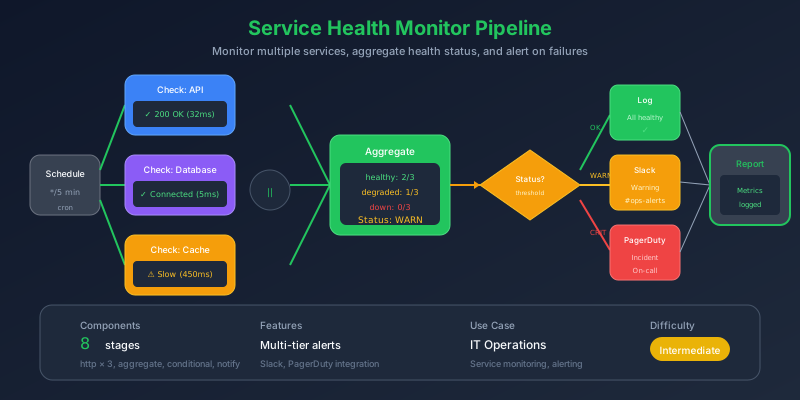
The Problem
You have 20+ services to monitor. Each has a /health endpoint, but:
- No unified view - Check each service individually in Datadog
- Alert storms - One database outage triggers 15 alerts
- False positives - Transient failures wake you up at 3am
- No context - “Service unhealthy” doesn’t tell you why
Pain Points We’re Solving
- Manual health checks - Running curl commands to debug
- Scattered dashboards - Switching between 5 monitoring tools
- Missing correlation - Is it one service or a cascade?
- Alert fatigue - Too many low-value notifications
Thinking Process
We need a pipeline that:
flowchart TB
    subgraph Strategy["Design Strategy"]
        S1["1. Get list of services"]
        S2["2. Check each health endpoint"]
        S3["3. Aggregate results"]
        S4["4. AI analysis of patterns"]
        S5["5. Smart alerting"]
    end

    S1 --> S2 --> S3 --> S4 --> S5
Key Insight: Parallel Health Checks with Aggregation
Check all services in parallel (fast), then aggregate results (smart). One failed health check might be transient; multiple failures in the same availability zone suggests infrastructure.
Solution Architecture
flowchart TB
    subgraph Input["Service Registry"]
        I1["20 services"]
        I2["health endpoints"]
        I3["SLA requirements"]
    end

    subgraph Check["Parallel Health Checks"]
        direction LR
        C1["api-gateway"]
        C2["auth-service"]
        C3["user-service"]
        C4["..."]
    end

    subgraph Aggregate["Analysis"]
        A1["Group by status"]
        A2["Calculate metrics"]
        A3["Detect patterns"]
    end

    subgraph Alert["Smart Alerting"]
        AL1["AI severity assessment"]
        AL2["Route by impact"]
        AL3["Include context"]
    end

    Input --> Check
    Check --> Aggregate
    Aggregate --> Alert
Pipeline Stages
Stage 1: Fetch Service Registry
Get the list of services to monitor:
{
  "id": "fetch-services",
  "component": "http-request",
  "config": {
    "url": "{{input.service_registry_url}}/services",
    "method": "GET",
    "headers": {
      "Authorization": "Bearer {{secrets.REGISTRY_TOKEN}}"
    },
    "timeout": 10000
  }
}
Stage 2: Health Check Each Service
Use foreach to check all services:
{
  "id": "foreach-service",
  "component": "foreach",
  "depends_on": ["fetch-services"],
  "config": {
    "items": "{{stages.fetch-services.output.body.services}}",
    "item_variable": "service",
    "stages": ["health-check", "validate-response", "evaluate-health"]
  }
}
Stage 3: Individual Health Check
{
  "id": "health-check",
  "component": "http-request",
  "config": {
    "url": "{{service.health_endpoint}}",
    "method": "GET",
    "timeout": "{{service.timeout_ms | default(5000)}}",
    "retry": {
      "max_attempts": 2,
      "delay_seconds": 1
    }
  }
}
Stage 4: Validate Response Schema
Ensure health check returns expected format:
{
  "id": "validate-response",
  "component": "schema-validate",
  "depends_on": ["health-check"],
  "config": {
    "data": "{{stages.health-check.output.body}}",
    "schema": {
      "type": "object",
      "required": ["status"],
      "properties": {
        "status": { "enum": ["healthy", "degraded", "unhealthy"] },
        "version": { "type": "string" },
        "uptime_seconds": { "type": "number" },
        "checks": {
          "type": "object",
          "additionalProperties": {
            "type": "object",
            "properties": {
              "status": { "type": "string" },
              "latency_ms": { "type": "number" }
            }
          }
        }
      }
    }
  }
}
Stage 5: Evaluate Health Status
{
  "id": "evaluate-health",
  "component": "filter",
  "depends_on": ["validate-response"],
  "config": {
    "mode": "transform",
    "data": {
      "service_name": "{{service.name}}",
      "endpoint": "{{service.health_endpoint}}",
      "status": "{{stages.health-check.output.body.status}}",
      "status_code": "{{stages.health-check.output.status_code}}",
      "response_time_ms": "{{stages.health-check.output.duration_ms}}",
      "checks": "{{stages.health-check.output.body.checks}}",
      "availability_zone": "{{service.availability_zone}}",
      "team": "{{service.team}}"
    }
  }
}
Stage 6: Aggregate All Results
Combine into unified health report:
{
  "id": "aggregate-results",
  "component": "json_transform",
  "depends_on": ["foreach-service"],
  "config": {
    "data": "{{stages.foreach-service.output}}",
    "expression": "{all_services: @, healthy: [?status == 'healthy'], degraded: [?status == 'degraded'], unhealthy: [?status == 'unhealthy'], by_zone: group_by(@, &availability_zone), by_team: group_by(@, &team), metrics: {total: length(@), healthy_count: length([?status == 'healthy']), unhealthy_count: length([?status == 'unhealthy']), avg_response_ms: avg([*].response_time_ms)}}"
  }
}
Stage 7: AI Pattern Analysis
Get intelligent insights from the health data:
{
  "id": "analyze-health",
  "component": "generator",
  "depends_on": ["aggregate-results"],
  "config": {
    "model": "gpt-4",
    "temperature": 0.3,
    "system_prompt": "You are an SRE analyzing service health data. Identify: 1) Critical issues requiring immediate action, 2) Patterns suggesting systemic problems, 3) Services at risk of failure, 4) Recommended actions. Be concise and actionable.",
    "prompt": "Analyze this health report:\n\nTotal services: {{stages.aggregate-results.output.metrics.total}}\nHealthy: {{stages.aggregate-results.output.metrics.healthy_count}}\nUnhealthy: {{stages.aggregate-results.output.metrics.unhealthy_count}}\n\nUnhealthy services:\n{{stages.aggregate-results.output.unhealthy | tojson}}\n\nDegraded services:\n{{stages.aggregate-results.output.degraded | tojson}}\n\nBy availability zone:\n{{stages.aggregate-results.output.by_zone | tojson}}\n\nWhat's the situation and what should we do?"
  }
}
Stage 8: Determine Alert Level
Route based on severity:
{
  "id": "check-alerts",
  "component": "conditional",
  "depends_on": ["aggregate-results", "analyze-health"],
  "config": {
    "condition": "{{stages.aggregate-results.output.metrics.unhealthy_count > 0 or stages.aggregate-results.output.metrics.healthy_count / stages.aggregate-results.output.metrics.total < 0.9}}",
    "if_true": ["send-alert"],
    "if_false": ["log-healthy"]
  }
}
Stage 9: Send Alert with Context
{
  "id": "send-alert",
  "component": "http-request",
  "depends_on": ["check-alerts", "analyze-health"],
  "config": {
    "url": "{{secrets.PAGERDUTY_EVENTS_URL}}",
    "method": "POST",
    "body": {
      "routing_key": "{{secrets.PAGERDUTY_ROUTING_KEY}}",
      "event_action": "trigger",
      "payload": {
        "summary": "{{stages.aggregate-results.output.metrics.unhealthy_count}} services unhealthy",
        "severity": "{{stages.aggregate-results.output.metrics.unhealthy_count > 3 ? 'critical' : 'warning'}}",
        "source": "flowmason-health-monitor",
        "custom_details": {
          "unhealthy_services": "{{stages.aggregate-results.output.unhealthy | map(attribute='service_name') | join(', ')}}",
          "ai_analysis": "{{stages.analyze-health.output}}",
          "total_services": "{{stages.aggregate-results.output.metrics.total}}",
          "healthy_percentage": "{{(stages.aggregate-results.output.metrics.healthy_count / stages.aggregate-results.output.metrics.total * 100) | round(1)}}%"
        }
      }
    }
  }
}
Stage 10: Log Summary
{
  "id": "log-summary",
  "component": "logger",
  "depends_on": ["check-alerts"],
  "config": {
    "level": "info",
    "message": "Health check complete: {{stages.aggregate-results.output.metrics.healthy_count}}/{{stages.aggregate-results.output.metrics.total}} healthy, avg response {{stages.aggregate-results.output.metrics.avg_response_ms}}ms"
  }
}
Execution Flow
flowchart LR
    subgraph Wave1["Wave 1"]
        F1["fetch-services"]
    end

    subgraph Wave2["Wave 2 (parallel)"]
        direction TB
        H1["health-check: api-gateway"]
        H2["health-check: auth-service"]
        H3["health-check: user-service"]
        H4["...20 services"]
    end

    subgraph Wave3["Wave 3"]
        A1["aggregate-results"]
    end

    subgraph Wave4["Wave 4"]
        AI["analyze-health"]
    end

    subgraph Wave5["Wave 5"]
        C["check-alerts"]
        AL["send-alert OR log-healthy"]
    end

    Wave1 --> Wave2 --> Wave3 --> Wave4 --> Wave5
Sample Input
{
  "service_registry_url": "https://registry.internal.company.com",
  "alert_threshold": {
    "unhealthy_count": 1,
    "healthy_percentage": 90
  },
  "teams_to_monitor": ["platform", "payments", "user-experience"]
}
Expected Output
{
  "summary": {
    "total_services": 20,
    "healthy": 17,
    "degraded": 2,
    "unhealthy": 1,
    "avg_response_ms": 45.3
  },
  "unhealthy_services": [
    {
      "service_name": "payment-processor",
      "status": "unhealthy",
      "status_code": 503,
      "response_time_ms": 5023,
      "team": "payments",
      "availability_zone": "us-east-1a"
    }
  ],
  "ai_analysis": "Critical: payment-processor is unhealthy with 503 status and 5s timeout. This appears to be an isolated issue (other us-east-1a services healthy). Recommended: Check payment-processor logs and database connectivity. Not a zone-wide issue.",
  "alert_sent": true,
  "alert_severity": "warning"
}
Key Learnings
1. Parallel Health Check Pattern
All services checked simultaneously:
flowchart TB
    subgraph Parallel["Parallel Execution"]
        direction LR
        S1["Service 1"]
        S2["Service 2"]
        S3["Service 3"]
        S4["..."]
    end
    Parallel --> Aggregate
20 services, 5 second timeout each = 5 seconds total (not 100 seconds).
2. Smart Aggregation
| Raw Data | Aggregated Insight |
|---|---|
| 20 individual checks | 3 unhealthy, 17 healthy |
| Scattered response times | Average: 45ms, P99: 200ms |
| Random failures | ”All failures in us-east-1a” |
3. AI-Powered Triage
The AI doesn’t replace monitoring - it adds context:
- Correlates failures across services
- Identifies cascade vs isolated issues
- Suggests specific debugging steps
- Reduces time-to-triage from 15 min to 1 min
Scheduling
Run this pipeline on a schedule:
# Every 5 minutes
fm schedule create \
  --pipeline health-monitor.pipeline.json \
  --cron "*/5 * * * *" \
  --name "production-health-check"
Try It Yourself
fm run pipelines/devops-health-monitor.pipeline.json \
  --input inputs/health-check-config.json