Build this pipeline yourself
Open in the interactive wizard to customize and export
Multi-API Aggregator
Parallel API calls with data transformation and aggregation
Components Used
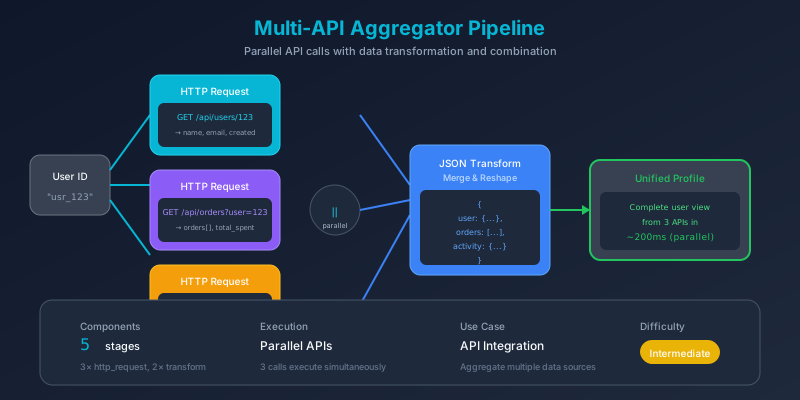
The Problem
Modern applications rely on data from multiple sources. A user profile view might need:
- User details from the authentication service
- Posts/activity from the content service
- Tasks/todos from the productivity service
Making these calls sequentially wastes time. If each takes 200ms, three calls take 600ms. But they’re independent - why wait?
Pain Points We’re Solving
- Slow page loads - Sequential API calls compound latency
- Complex orchestration - Managing parallel requests is error-prone
- Data silos - Information scattered across services
- Inconsistent responses - Each API has different formats
Thinking Process
We need to design a pipeline that:
flowchart TB
    subgraph Strategy["Design Strategy"]
        S1["1. Identify independent calls"]
        S2["2. Execute in parallel"]
        S3["3. Transform each response"]
        S4["4. Aggregate results"]
    end

    S1 --> S2 --> S3 --> S4
Key Insight: Wave-Based Execution
FlowMason automatically parallelizes stages with no dependencies:
gantt
    title Sequential vs Parallel Execution
    dateFormat X
    axisFormat %L ms

    section Sequential
    Fetch User    :0, 200
    Fetch Posts   :200, 400
    Fetch Todos   :400, 600

    section Parallel
    Fetch User    :0, 200
    Fetch Posts   :0, 200
    Fetch Todos   :0, 200
Result: 3x faster with the same code!
Solution Architecture
flowchart TB
    subgraph Input["📥 Input"]
        I1["user_id: 1"]
    end

    subgraph Parallel["⚡ Parallel HTTP Requests"]
        direction LR
        H1["GET /users/1"]
        H2["GET /posts?userId=1"]
        H3["GET /todos?userId=1"]
    end

    subgraph Transform["🔄 Transform Responses"]
        direction LR
        T1["Extract user fields"]
        T2["Map post previews"]
        T3["Group todos by status"]
    end

    subgraph Aggregate["📊 Aggregate"]
        A1["Combine all data"]
        A2["Add statistics"]
        A3["Verify all succeeded"]
    end

    Input --> Parallel
    H1 --> T1
    H2 --> T2
    H3 --> T3
    T1 --> Aggregate
    T2 --> Aggregate
    T3 --> Aggregate
Pipeline Stages
Stage 1-3: Parallel HTTP Requests
All three requests execute simultaneously:
sequenceDiagram
    participant P as Pipeline
    participant U as Users API
    participant Po as Posts API
    participant T as Todos API

    par Parallel Requests
        P->>U: GET /users/1
        P->>Po: GET /posts?userId=1
        P->>T: GET /todos?userId=1
    end

    U-->>P: User data
    Po-->>P: Posts array
    T-->>P: Todos array

    Note over P: All responses received ~200ms
{
"id": "fetch-user",
"component": "http-request",
"config": {
"url": "https://jsonplaceholder.typicode.com/users/{{input.user_id}}",
"method": "GET",
"timeout": 30000
}
}{
"id": "fetch-posts",
"component": "http-request",
"config": {
"url": "https://jsonplaceholder.typicode.com/posts?userId={{input.user_id}}",
"method": "GET",
"timeout": 30000
}
}{
"id": "fetch-todos",
"component": "http-request",
"config": {
"url": "https://jsonplaceholder.typicode.com/todos?userId={{input.user_id}}",
"method": "GET",
"timeout": 30000
}
}Stage 4: Transform User Data
Extract the fields we need:
{
  "id": "transform-user",
  "component": "json_transform",
  "depends_on": ["fetch-user"],
  "config": {
    "data": "{{stages.fetch-user.output.body}}",
    "expression": "{id: id, name: name, username: username, email: email, company: company.name, city: address.city, website: website}"
  }
}
Stage 5: Transform Posts
Create preview snippets:
{
  "id": "transform-posts",
  "component": "json_transform",
  "depends_on": ["fetch-posts"],
  "config": {
    "data": "{{stages.fetch-posts.output.body}}",
    "expression": "[*].{id: id, title: title, body_preview: body[0:100]}"
  }
}
Stage 6: Group Todos
Organize by completion status:
{
  "id": "transform-todos",
  "component": "json_transform",
  "depends_on": ["fetch-todos"],
  "config": {
    "data": "{{stages.fetch-todos.output.body}}",
    "expression": "{all: @, completed: [?completed == `true`], pending: [?completed == `false`]}"
  }
}
Stage 7: Aggregate All Data
Combine into unified response:
{
  "id": "aggregate-data",
  "component": "json_transform",
  "depends_on": ["transform-user", "transform-posts", "transform-todos"],
  "config": {
    "data": {
      "user": "{{stages.transform-user.output}}",
      "posts": "{{stages.transform-posts.output}}",
      "todos": "{{stages.transform-todos.output}}"
    },
    "expression": "{user: user, posts: posts, todos: todos, summary: {post_count: length(posts), todo_count: length(todos.all), completed_todos: length(todos.completed), pending_todos: length(todos.pending)}, api_status: 'all_succeeded'}"
  }
}
Execution Timeline
flowchart LR
    subgraph Wave1["Wave 1 (0-200ms)"]
        direction TB
        W1A["fetch-user"]
        W1B["fetch-posts"]
        W1C["fetch-todos"]
    end

    subgraph Wave2["Wave 2 (200-210ms)"]
        direction TB
        W2A["transform-user"]
        W2B["transform-posts"]
        W2C["transform-todos"]
    end

    subgraph Wave3["Wave 3 (210-215ms)"]
        W3A["aggregate-data"]
    end

    subgraph Wave4["Wave 4 (215-220ms)"]
        W4A["log-summary"]
    end

    Wave1 --> Wave2 --> Wave3 --> Wave4
Sample Input
{
  "user_id": "1",
  "include_posts": true,
  "include_todos": true
}
Expected Output
{
  "user": {
    "id": 1,
    "name": "Leanne Graham",
    "username": "Bret",
    "email": "[email protected]",
    "company": "Romaguera-Crona",
    "city": "Gwenborough",
    "website": "hildegard.org"
  },
  "posts": [
    {
      "id": 1,
      "title": "sunt aut facere repellat provident...",
      "body_preview": "quia et suscipit\nsuscipit recusandae..."
    }
    // ... more posts
  ],
  "todos": {
    "all": [/* 20 todos */],
    "completed": [/* 11 completed */],
    "pending": [/* 9 pending */]
  },
  "summary": {
    "post_count": 10,
    "todo_count": 20,
    "completed_todos": 11,
    "pending_todos": 9
  },
  "api_status": "all_succeeded"
}
Key Learnings
1. Parallel Execution Pattern
flowchart LR
    A[Input] --> B[Stage 1]
    A --> C[Stage 2]
    A --> D[Stage 3]
    B --> E[Aggregate]
    C --> E
    D --> E
No depends_on between stages = automatic parallelization.
2. Response Transformation
| API Response | Transformed |
|---|---|
| Nested objects | Flattened fields |
| Full content | Preview snippets |
| Flat array | Grouped by status |
3. Error Handling Consideration
In production, wrap each HTTP request in trycatch to handle individual API failures gracefully (see Demo 5).
Try It Yourself
fm run pipelines/03-api-aggregator.pipeline.json \
  --input inputs/03-api-aggregator.json