Build this pipeline yourself
Open in the interactive wizard to customize and export
05
Error Handling & Recovery
Try-catch patterns with fallback data and graceful degradation
intermediate Resilient Systems
Components Used
trycatch http_request json_transform logger
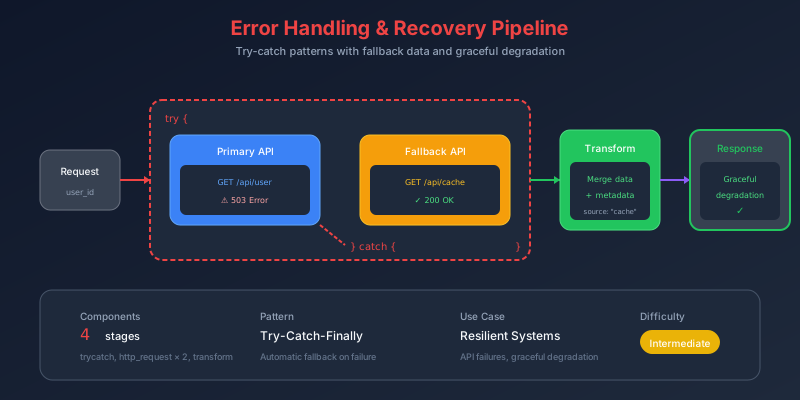
The Problem
External services fail. Networks timeout. APIs return errors. In production, these failures shouldn’t crash your entire pipeline. Instead, you need:
- Graceful degradation - Use cached/fallback data when live data unavailable
- Continued execution - Don’t let one failure stop everything
- Visibility - Know which path was taken and why
- Retry logic - Some failures are transient
Pain Points We’re Solving
- Brittle pipelines - One API timeout crashes everything
- No fallbacks - Users see errors instead of cached data
- Silent failures - Issues go unnoticed until reports break
- Complex retry code - Exponential backoff is hard to implement
Thinking Process
Let’s design a resilient data fetching pattern:
flowchart TB
    subgraph Decision["Error Handling Strategy"]
        D1["What could fail?"]
        D2["What's the impact?"]
        D3["What's the fallback?"]
        D4["Should we retry?"]
    end

    D1 --> D2 --> D3 --> D4
Error Handling Decision Tree
flowchart TD
    Start["API Call"] --> Try["Try Block"]
    Try --> Success{"Success?"}

    Success -->|Yes| Process["Process Response"]
    Success -->|No| Catch["Catch Block"]

    Catch --> ErrorType{"Error Type?"}
    ErrorType -->|Timeout| Retry["Retry with backoff"]
    ErrorType -->|404| Fallback["Use fallback data"]
    ErrorType -->|Auth| Fail["Fail pipeline"]

    Retry --> RetryCount{"Retries < Max?"}
    RetryCount -->|Yes| Try
    RetryCount -->|No| Fallback

    Fallback --> Continue["Continue pipeline"]
    Process --> Continue
Solution Architecture
flowchart TB
    subgraph Input["📥 Input"]
        I1["api_url"]
        I2["fallback_data"]
    end

    subgraph TryCatch["🔄 TryCatch Block"]
        subgraph Try["Try"]
            T1["HTTP Request"]
            T2["Parse Response"]
        end

        subgraph Catch["Catch"]
            C1["Log Error"]
            C2["Use Fallback"]
        end
    end

    subgraph Process["📊 Process Result"]
        P1["Determine source"]
        P2["Track success/failure"]
        P3["Continue pipeline"]
    end

    Input --> TryCatch
    Try -->|success| Process
    Catch -->|fallback| Process
Pipeline Stages
Stage 1: Log Request Start
{
  "id": "log-start",
  "component": "logger",
  "config": {
    "level": "info",
    "message": "Starting API request",
    "data": {
      "url": "{{input.api_url}}"
    }
  }
}
Stage 2: TryCatch Wrapper
The key to resilient pipelines - wrap risky operations:
{
  "id": "try-api-call",
  "component": "trycatch",
  "depends_on": ["log-start"],
  "config": {
    "try_stages": ["fetch-api"],
    "catch_stages": ["use-fallback"],
    "error_scope": "continue"
  }
}
Configuration Options:
| Option | Value | Effect |
|---|---|---|
error_scope | "continue" | Pipeline continues after error |
error_scope | "propagate" | Error bubbles up (default) |
Stage 3: HTTP Request (Inside Try)
{
  "id": "fetch-api",
  "component": "http-request",
  "config": {
    "url": "{{input.api_url}}",
    "method": "GET",
    "timeout": 10000,
    "headers": {
      "Accept": "application/json"
    }
  }
}
Stage 4: Fallback Handler (Inside Catch)
{
  "id": "use-fallback",
  "component": "json_transform",
  "config": {
    "data": "{{input.fallback_data}}",
    "expression": "merge(@, {source: 'fallback', fetched_at: now()})"
  }
}
Stage 5: Process Result
Determine which path was taken:
{
  "id": "process-result",
  "component": "json_transform",
  "depends_on": ["try-api-call"],
  "config": {
    "data": {
      "trycatch_result": "{{stages.try-api-call.output}}",
      "api_status": "{{stages.try-api-call.status}}"
    },
    "expression": "{success: api_status == 'try_succeeded', source: api_status == 'try_succeeded' && 'api' || 'fallback', data: trycatch_result}"
  }
}
Execution Flow Visualization
sequenceDiagram
    participant P as Pipeline
    participant TC as TryCatch
    participant API as External API
    participant FB as Fallback

    P->>TC: Start try block

    alt API Success
        TC->>API: HTTP Request
        API-->>TC: 200 OK + Data
        TC->>P: try_succeeded
        Note over P: source: "api"
    else API Failure
        TC->>API: HTTP Request
        API-->>TC: Timeout/Error
        TC->>FB: Execute catch stages
        FB-->>TC: Fallback data
        TC->>P: catch_executed
        Note over P: source: "fallback"
    end

    P->>P: Continue pipeline
Error Scope Comparison
flowchart LR
    subgraph Continue["error_scope: continue"]
        C1["Error occurs"] --> C2["Catch executes"]
        C2 --> C3["Pipeline continues ✓"]
    end

    subgraph Propagate["error_scope: propagate"]
        P1["Error occurs"] --> P2["Catch executes"]
        P2 --> P3["Error bubbles up ✗"]
    end
Sample Input
{
  "api_url": "https://jsonplaceholder.typicode.com/posts/1",
  "fallback_data": {
    "id": 0,
    "title": "Fallback Content",
    "body": "This fallback content is displayed when the API is unavailable.",
    "cached_at": "2024-01-15T10:30:00Z"
  },
  "simulate_error": false
}
Expected Output (Success)
{
  "success": true,
  "source": "api",
  "data": {
    "id": 1,
    "title": "sunt aut facere repellat provident...",
    "body": "quia et suscipit...",
    "userId": 1
  }
}
Expected Output (Failure)
{
  "success": false,
  "source": "fallback",
  "data": {
    "id": 0,
    "title": "Fallback Content",
    "body": "This fallback content is displayed when the API is unavailable.",
    "cached_at": "2024-01-15T10:30:00Z",
    "source": "fallback",
    "fetched_at": "2024-01-16T14:22:00Z"
  }
}
Key Learnings
1. TryCatch Anatomy
flowchart TB
    subgraph TryCatch["trycatch component"]
        T["try_stages: [stage1, stage2]"]
        C["catch_stages: [fallback]"]
        S["error_scope: continue|propagate"]
    end
2. When to Use Each Error Scope
| Scenario | Error Scope | Reason |
|---|---|---|
| Optional data enrichment | continue | Missing data is okay |
| Critical business data | propagate | Must have correct data |
| Cached fallbacks available | continue | Stale data better than none |
| Financial transactions | propagate | Cannot guess amounts |
3. Status Values
| Status | Meaning |
|---|---|
try_succeeded | Try block completed successfully |
catch_executed | Error occurred, catch block ran |
Production Patterns
Pattern 1: Retry with Backoff
{
  "id": "retry-wrapper",
  "component": "trycatch",
  "config": {
    "try_stages": ["attempt-1"],
    "catch_stages": ["wait-backoff", "attempt-2"],
    "error_scope": "continue"
  }
}
Pattern 2: Multiple Fallbacks
{
  "id": "cascading-fallback",
  "component": "trycatch",
  "config": {
    "try_stages": ["primary-api"],
    "catch_stages": ["try-secondary-api"],
    "error_scope": "continue"
  }
}
Try It Yourself
fm run pipelines/05-error-handling.pipeline.json \
  --input inputs/05-error-handling.json