Build this pipeline yourself
Open in the interactive wizard to customize and export
07
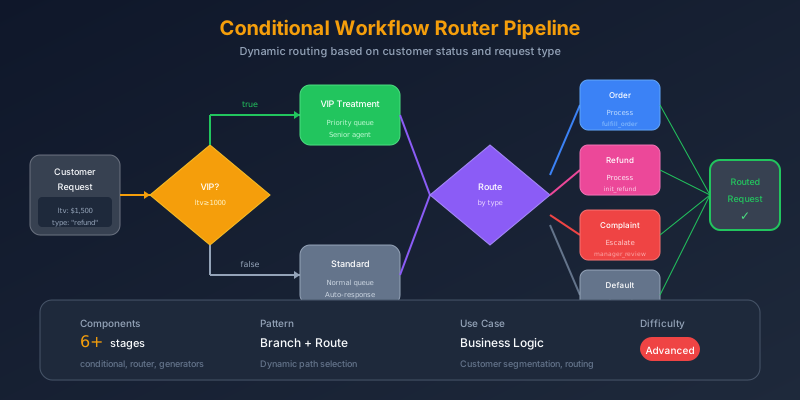
Conditional Workflow Router
Dynamic routing based on customer status, request type, and priority
advanced Business Logic
Components Used
conditional router generator json_transform logger
The Problem
Business logic is rarely linear. Customer requests need different handling based on:
- Who they are - VIP customers get priority treatment
- What they want - Orders, refunds, and complaints need different teams
- How urgent it is - Critical issues need escalation
- Combinations - VIP + complaint + urgent = immediate manager attention
Hard-coding these rules leads to unmaintainable spaghetti logic.
Pain Points We’re Solving
- Complex branching - Multiple nested if/else statements
- Inconsistent routing - Different agents make different decisions
- Missed escalations - Important cases fall through cracks
- Hard to modify - Changing rules requires code changes
Thinking Process
Let’s model the business rules as a decision tree:
flowchart TD
    Start["Customer Request"]

    Start --> VIP{"Lifetime Value<br/>≥ $1000?"}

    VIP -->|Yes| VIPPath["VIP Treatment<br/>SLA: 4 hours"]
    VIP -->|No| StandardPath["Standard Treatment<br/>SLA: 24 hours"]

    VIPPath --> TypeRoute
    StandardPath --> TypeRoute

    TypeRoute{"Request Type?"}

    TypeRoute -->|order| OrderTeam["Orders Team"]
    TypeRoute -->|refund| FinanceTeam["Finance Team<br/>+ Approval Required"]
    TypeRoute -->|inquiry| SupportTeam["Support Team"]
    TypeRoute -->|complaint| EscalationTeam["Escalation Team"]

    EscalationTeam --> PriorityCheck{"Priority?"}

    PriorityCheck -->|urgent/high| NotifyManager["Notify Manager"]
    PriorityCheck -->|medium/low| Normal["Normal Processing"]
Two-Level Decision Making
- Conditional - Binary yes/no decisions (VIP check)
- Router - Multi-way branching (request type)
Solution Architecture
flowchart TB
    subgraph Input["📥 Customer Request"]
        I1["request_type"]
        I2["priority"]
        I3["customer_data"]
        I4["message"]
    end

    subgraph VIPCheck["⭐ VIP Classification"]
        V1{"lifetime_value >= 1000?"}
        V2["VIP Path<br/>SLA: 4h"]
        V3["Standard Path<br/>SLA: 24h"]
    end

    subgraph Router["🔀 Request Router"]
        R1{"request_type"}
        R2["process-order"]
        R3["process-refund"]
        R4["process-inquiry"]
        R5["process-complaint"]
    end

    subgraph Escalation["⚠️ Escalation Check"]
        E1{"urgent OR high?"}
        E2["notify-manager"]
    end

    subgraph Response["💬 Response"]
        RE1["Generate AI response"]
        RE2["Format output"]
    end

    Input --> VIPCheck
    V1 -->|Yes| V2
    V1 -->|No| V3
    V2 --> Router
    V3 --> Router

    R1 -->|order| R2
    R1 -->|refund| R3
    R1 -->|inquiry| R4
    R1 -->|complaint| R5

    R5 --> Escalation
    E1 -->|Yes| E2

    Router --> Response
    Escalation --> Response
Pipeline Stages
Stage 1: VIP Status Check
Binary conditional based on lifetime value:
{
  "id": "check-vip",
  "component": "conditional",
  "config": {
    "condition": "{{input.customer_data.lifetime_value}} >= 1000",
    "then_stages": ["set-vip-treatment"],
    "else_stages": ["set-standard-treatment"]
  }
}
Stage 2a: VIP Treatment
{
  "id": "set-vip-treatment",
  "component": "json_transform",
  "config": {
    "data": "{{input.customer_data}}",
    "expression": "merge(@, {treatment: 'vip', dedicated_support: `true`, sla_hours: `4`})"
  }
}
Stage 2b: Standard Treatment
{
  "id": "set-standard-treatment",
  "component": "json_transform",
  "config": {
    "data": "{{input.customer_data}}",
    "expression": "merge(@, {treatment: 'standard', dedicated_support: `false`, sla_hours: `24`})"
  }
}
Stage 3: Route by Request Type
Multi-way branching with the router:
{
  "id": "route-by-type",
  "component": "router",
  "depends_on": ["check-vip"],
  "config": {
    "expression": "{{input.request_type}}",
    "routes": {
      "order": ["process-order"],
      "refund": ["process-refund"],
      "inquiry": ["process-inquiry"],
      "complaint": ["process-complaint", "escalate-check"]
    }
  }
}
Note: Complaints trigger both processing AND escalation check!
Team Processing Stages
Each team has specific handling:
flowchart LR
    subgraph OrderTeam["Orders"]
        O1["team: orders_team"]
        O2["action: track_order"]
    end

    subgraph FinanceTeam["Finance"]
        F1["team: finance_team"]
        F2["requires_approval: true"]
    end

    subgraph SupportTeam["Support"]
        S1["team: support_team"]
        S2["action: answer_inquiry"]
    end

    subgraph EscalationTeam["Escalation"]
        E1["team: escalation_team"]
        E2["high_priority: true"]
    end
{
"id": "process-refund",
"component": "json_transform",
"config": {
"data": {
"request_type": "{{input.request_type}}",
"customer": "{{input.customer_data}}"
},
"expression": "{team: 'finance_team', action: 'process_refund', requires_approval: `true`, priority_boost: customer.lifetime_value >= `5000`}"
}
}Stage 4: Escalation Check (Complaints Only)
Nested conditional for urgent complaints:
{
  "id": "escalate-check",
  "component": "conditional",
  "config": {
    "condition": "{{input.priority}} == 'urgent' || {{input.priority}} == 'high'",
    "then_stages": ["notify-manager"]
  }
}
Stage 5: Manager Notification
{
  "id": "notify-manager",
  "component": "logger",
  "config": {
    "level": "warn",
    "message": "ESCALATION: {{input.customer_data.name}} - {{input.request_type}}",
    "data": {
      "priority": "{{input.priority}}",
      "lifetime_value": "{{input.customer_data.lifetime_value}}",
      "requires_immediate_attention": true
    }
  }
}
Stage 6: Generate Response
{
  "id": "generate-response",
  "component": "generator",
  "depends_on": ["route-by-type"],
  "config": {
    "system_prompt": "You are a customer service agent. Write brief, empathetic acknowledgments.",
    "prompt": "Write a 2-3 sentence acknowledgment for:\nCustomer: {{input.customer_data.name}}\nRequest: {{input.request_type}}\nMessage: {{input.message}}\n\nBe empathetic and set expectations.",
    "temperature": 0.7,
    "max_tokens": 150
  }
}
Routing Decision Table
flowchart LR
    subgraph Decision["Complete Routing Logic"]
        D1["VIP Check"] --> D2["Type Router"]
        D2 --> D3["Team Assignment"]
        D3 --> D4["Escalation Check"]
        D4 --> D5["Response Generation"]
end| Request Type | Team | Special Handling |
|---|---|---|
| order | orders_team | Track order status |
| refund | finance_team | Requires approval |
| inquiry | support_team | Standard response |
| complaint | escalation_team | Check for escalation |
| Priority + Type | Action |
|---|---|
| urgent + complaint | Notify manager immediately |
| high + complaint | Notify manager |
| any + enterprise | VIP treatment, 4h SLA |
Sample Input: VIP Complaint
{
  "request_type": "complaint",
  "priority": "urgent",
  "customer_data": {
    "name": "Sarah Johnson",
    "email": "[email protected]",
    "account_type": "enterprise",
    "lifetime_value": 15000
  },
  "message": "I am extremely disappointed with the service outage that affected our entire team yesterday. We lost 4 hours of productivity and this is unacceptable for an enterprise customer paying premium rates."
}
Expected Output
{
  "workflow_path": "vip → complaint → escalation",
  "customer_treatment": {
    "treatment": "vip",
    "dedicated_support": true,
    "sla_hours": 4
  },
  "assigned_team": "escalation_team",
  "escalated": true,
  "manager_notified": true,
  "auto_response": "Dear Sarah, I sincerely apologize for the service disruption your team experienced. As a valued enterprise customer, this falls far below our standards. I've escalated this to our management team and you'll receive a detailed incident report within 4 hours, along with a discussion of compensation for the productivity loss."
}
Key Learnings
1. Conditional vs Router
flowchart LR
    subgraph Conditional["conditional"]
        C1["Binary choice"]
        C2["if/else"]
        C3["Boolean condition"]
    end

    subgraph Router["router"]
        R1["Multiple choices"]
        R2["switch/case"]
        R3["Expression matching"]
    end
2. Route to Multiple Stages
The router can trigger multiple stages for one route:
"complaint": ["process-complaint", "escalate-check"]3. Nested Control Flow
You can nest conditionals inside routes for complex logic trees.
Try It Yourself
# VIP complaint (triggers escalation)
fm run pipelines/07-conditional-workflow.pipeline.json \
  --input inputs/07-workflow-complaint.json

# Standard order (simple routing)
fm run pipelines/07-conditional-workflow.pipeline.json \
  --input inputs/07-workflow-order.json