FlowMason Solutions
Production-ready AI pipeline templates for real-world challenges. From human services to infrastructure automation.
Human Services
AI-augmented support for counsellors, social workers, and care providers
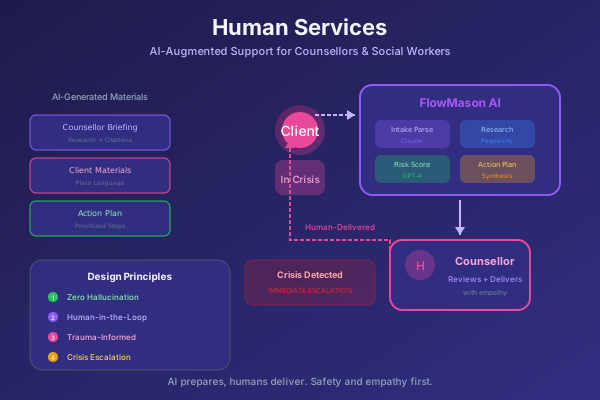
Financial Counselling for Gambling Harm
Complete intake-to-action workflow for counselling services
Production-ready solution for financial counsellors supporting clients affected by gambling harm. Multi-provider AI orchestration with verified research, crisis detection, and empathetic document generation.
Client Contact
    |
    +- [1] Empathetic Intake (Claude)
    |
    +- [2] Crisis Detection --> Human Escalation
    |
    +- [3] Risk Assessment (GPT-4)
    |
    +- [4] Verified Research (Perplexity x 4)
    |       +- Hardship Programs
    |       +- Local Services
    |       +- Legal Protections
    |       +- Creditor Policies
    |
    +- [5] Action Plan Synthesis
    |
    +- [6] Generate Documents
            +- Counsellor Briefing
            +- Client Materials
Mental Health Intake
Coming soon
Housing Support
Coming soon
Family Services
Coming soon
Infrastructure & DevOps
CI/CD automation, API orchestration, and incident response
Built for production: These patterns include proper retry logic, error handling, and observability. The AI enhancement is useful, but the orchestration makes them production-ready.
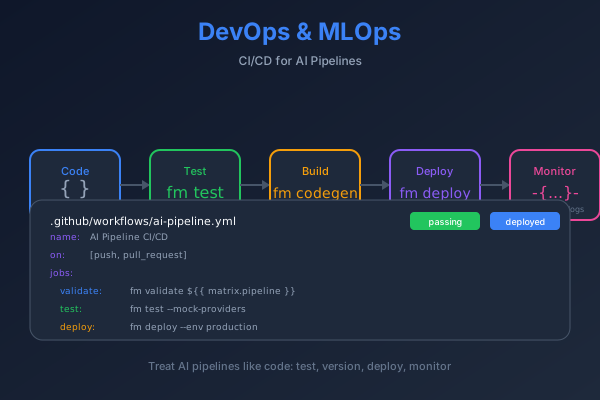
DevOps & CI/CD
Orchestrate CI/CD APIs with proper retry and timeout handling. Conditional promotion gates, automatic rollback on health check failure, and AI analysis of deployment failures.
trigger_build (GitHub API)
    |
    +-- poll_status (retry: 30x)
    |
    +-- deploy_staging (K8s API)
    |       +-- health_check (retry: 12x)
    |
    +-- run_integration_tests
            +-- [pass] deploy_production
            +-- [fail] ai_analyze + rollback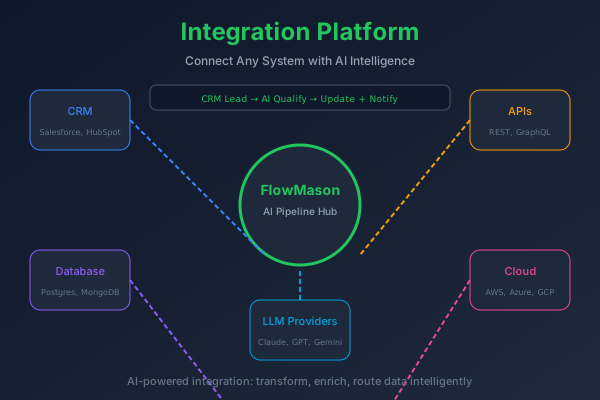
Integration & APIs
Parallel API calls with independent retry logic per source. Schema validation, data transformation with JMESPath/Jinja2, and AI enrichment for insights extraction.
validate_input (schema)
    |
    +-- fetch_salesforce --+
    |   (retry: 3x)        |
    |                      +-- merge_data
    +-- fetch_stripe ------+       |
    |   (retry: 3x)        |       +-- transform
    |                      |       |
    +-- fetch_intercom ----+       +-- ai_enrich
        (retry: 3x)                |
                                   +-- output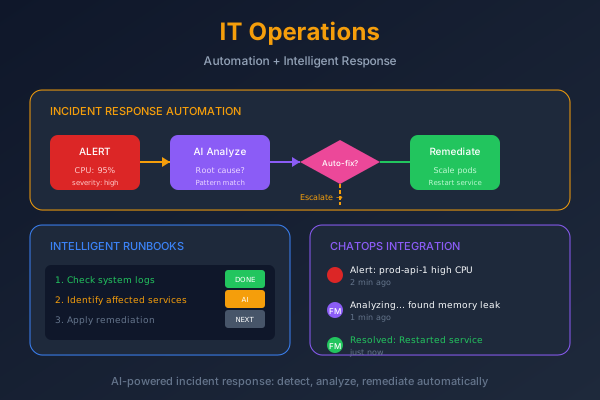
IT Operations
Receive alerts via webhook, automatically fetch context. AI-powered root cause analysis, auto-remediation for known issues, and escalation when uncertainty is high.
receive_alert (webhook)
    |
    +-- fetch_logs + metrics + deploys
            |
            +-- ai_analyze_root_cause
                    |
                    +-- [known] auto_remediate
                    |       +-- [success] notify
                    |       +-- [fail] escalate
                    |
                    +-- [unknown] escalate
Enterprise
Native integrations for CRM, ticketing, and enterprise platforms
Salesforce Integration
BetaNative FlowMason pipelines running inside Salesforce. Process records, automate workflows, and leverage AI without leaving your CRM environment.
- Process SOQL queries
- Trigger on record changes
- Multi-provider AI (Claude, GPT-4)
- Write results back to SF
Request a Solution as a Service
Let us build and deploy your FlowMason pipeline
Don't have time to implement yourself? Our team can build, customize, and deploy any FlowMason solution for your organization. From Financial Counselling to custom DevOps pipelines.
Solution request form coming soon.
For now, please email us at [email protected] to discuss your needs.
Supported Integrations
Ready to get started?
Explore our solutions, try the demos, or request a custom implementation.